Saturday, 1 May 2010

Women's appointments

A couple of weeks ago I was helping my mother move some furniture and found a newspaper from Saturday December 23rd 1967 which had been used as drawer lining. I skimmed through it and eventually found the "Women's Appointments" section.


Of course you would never see anything like this in the UK now, not since the sex discrimination act in 1975. The weird thing is that I would not have seen anything odd about this section in a newspaper in 1967. In fact, I applied for a job in 1973 as a lab technician for a chemical company and was not even mildly annoyed when they wrote back and said the job was only available to men. It makes me wonder how much I accept now without thinking too much about it.

Thirty five years after the act there are clearly still things wrong in the UK. For example, why do so few girls go into computer science? For any teenage girl with a flair for maths it should be such an obvious career choice. My daughter obtained her degree in computer science last year and is very happily working for Assanka in London. However, I suspect that she might never have followed that route if I hadn't worked for IBM. It's also probably true that I wouldn't have pursued a career in science if my mother had not been a doctor. How long will it take to push through enough role models to even things out? Generations?

It's not all bad though, my son is a dancer and currently touring with Matthew Bourne's Swan Lake. I cannot imagine what would have happened in the the 1960s if a child of intellectual middle class parents had insisted that all he wanted to do was dance.

Sunday, 18 April 2010

Reflections on Open Source Jumpstart #GDCOSJ1

When you work on an Open Source project most of your communication with colleagues will be through the mailing list or maybe on IRC. This works great 90% of the time but I think everyone understands that occasionally it's really helpful to meet and talk to the people you work with. Traditionally this has happened at conferences, for example ApacheCon, EclipseCon and so on.

That's fine for people that are established committers - but what about people who want to start? Those mailing lists are pretty intimidating aren't they? Then when you do screw up the courage to write a note sometimes it never gets answered and you don't know why not. Or sometimes people don't read your question properly and answer something else. It can seem very unwelcoming. Initiatives like GSOC do a good job but they also miss the face to face element.

It was just because of this that we decided to run Open Source Jumpstart. We wanted students to meet committers face to face, just once. It's amazing how many of those getting started barriers can be broken down with one day's work. It would be great if any of the students from Saturday carried on working on Open Source projects - however, even if they don't, in that one day's work bugs were fixed in every project and students learnt about how code is developed.

There isn't much that's more satisfying than bringing two groups of people together and seeing both of them get something out of the experience. Have a look at the Meetup to see feedback from the event.

Saturday, 17 April 2010

Open Source Jumpstart #GDCOSJ1

Yesterday's GDC Open Source Jumpstart was amazing!

Thanks to all the open source projects that came:

  1. Apache Aries
  2. Apache Harmony
  3. Apache Tomcat
  4. Apache Tuscany
  5. Apache Wookie
  6. Citrine
  7. Ikasan
  8. Impala
  9. PHP

You guys worked so hard all day!

Thanks to all the students that came along and fixed bugs, wrote tests and documentation. Well done! I can't believe how far people came (from Edinburgh in one case) - you represent the future of software development and it was great to meet you.

Thanks to IBM for letting us use their wonderful Southbank location and to the IBM Innovation Centre in Hursley for providing the food. The Innovation Centre have some great (free) resources for students, if any of you missed the links, here they are again:

  1. Mydeveloperworks - all sorts of resources for creating groups, wikis etc
  2. Student portal - competitions, stuff about jobs etc

Finally - thanks to Barry Cranford for being a continual positive inspiration and to the rest of the GDC organising committee for pulling yesterday's event together.

Yes, I really think we might do this again!

Sunday, 11 April 2010

Apache programmers study Leech Farming in Ireland

For the last three days I've been in a Youth Hostel in rural Ireland with a bunch of programmers. Sounds like hell? Actually quite the reverse. It was probably the best 'unconference style' event that I've been to. So many things made it work - here are a few:
  • Beautiful countryside (most of us did a couple of hours walk on Saturday)
  • Everyone staying overnight for two days - no splitting up to go out to different pubs/restaurants etc
  • The weather - yes, it was sunny - in Ireland - in April - for three consecutive days.
  • Great mixture of projects, people, talks and coding time.
  • The only use of PowerPoint was in 'Presentation Karaoke' - a right and fitting use for PowerPoint. This is where the Leech Farming came in.
Thanks go to Noirin Shirley for the organisation, not only for doing the normal hassle stuff (booking the hostel, organising the food) but also for roping in her husband to collect us from Bray station and persuading her parents to turn up with home baked bread on the last day.

Here is a shot of Andrus Adamchick at breakfast on the last day - just to give an idea of what the place was like.


These events are somehow much more satisfying than the huge, expensive conferences. I come away feeling that I've learned something and met some great people. I'm looking forward to the next one already.

Monday, 8 March 2010

Persistence layers in the Apache Aries Blog Sample

When we first added the Blog Sample to Apache Aries there was no support in Aries for JPA, so the sample was written with a JDBC persistence layer. Over the past month or so JPA support has been added to Aries, as a result I spent some time last week getting a new JPA version of the blog persistence layer to work on Aries components.

The samples in Aries are deigned so that they run on an OSGi platform which pulls in just enough components to run the application, for the blog sample we use Equinox as a base and build up from there.

Here are a couple of small statistics comparing the JPA and JDBC persistence implementations in the Aries blog sample:

The Java code is much more concise using JPA, the complexity has all moved into the platform. Which is, of course, the right way to go.

Friday, 12 February 2010

WebSphere from the ground up - part two

A week or so ago I posted on how to do an 'assume nothing' installation of WebSphere in order to run the OSGi Alpha Feature pack. Today the Open Beta of the OSGi Feature Pack was released and the requirements and installation process differ slightly from those required by the Alpha.

The basic steps are pretty much the same, differences are shown in this color:

  1. Install the free-for-developers WebSphere Application Server Version 7
  2. Install the 7.0.0.7 Fix pack and an update to the Java SDK for WAS
  3. Install the Open Beta OSGi Feature pack using the IBM Installation Manager.
Following the instructions for the Alpha works up to half way through step 2. But here, as well as downloading the 7.0.0.7 Fix pack you will need to download an SDK update from here. The file will be called something like 7.0.0-WS-WASSDK-LinuxX32-FP0000007.pak. Put this file in the same directory as you put the 7.0.0.7 Fix pack, then run the UpdateInstaller as directed in the previous post to install both fixes.

To install the Open Beta you will need to start with this link . Scroll down till you find these two links:


The first link (Web install...) is the one you want. You will download a preconfigured version on the installation manager which already has links to the repositories containing the Beta download.

Click on the Web install link and follow through the next screens till you find an option to download the IBM installation manager. It is about 86MB and will be called something like iim.linux.x86_20100128.zip. Download it and unzip it in a temporary directory, then run the install script in that directory.

The installation manager will start up and ask if you want to install Version 1.3.4 of the installation manager. Continue with the installation of V1.3.4 through to the end when you will be asked if you want to restart, accept this option. When the installation manager restarts you will be prompted for an ID and password, these will be the same ones as you would have used to download WAS in the first place.

The next two steps are to 'Import' your existing WAS installation into the installation manager. After that you will be able 'Install' the Beta code from a remote repository which has already been configured in the Installation Manager.

At the end if the Beta installation the profile management tool will be launched, you will need to augment your profile with the OSGi feature pack. Again, the screens are easy to follow.

This is a fairly high level view of the instructions, there are excellent and very detailed steps available from here in the getting started guide.

Tuesday, 2 February 2010

WebSphere Application Server - from the bottom up.

Recently I installed the IBM WebSphere Application Server from scratch so that I could look at the OSGi support for enterprise applications available in WebSphere. Google was not my friend in this instance - I couldn't find a quick summary of the instructions for installing the WebSphere Application Server anywhere. It is actually all quite easy, not to mention free. In this post I'll provide a brief overview of the steps and links to download sites. If you want more detail, look here for information on every supported operating system. I used an unsupported operating system (Ubuntu**) and for the purposes of experimenting with the OSGi support this works just fine. Although I use Linux commands throughout this, the same thing will work on Windows with the appropriate modifications to paths and exchanging .bat for .sh files.

There are three steps:
  1. Install the WebSphere Application Server Version 7
  2. Install the version 7.0.0.7 Fix Pack
  3. Install the Alpha OSGi Feature Pack

1. Install the WebSphere Application Server Version 7


This is free for development use and all you have to give IBM is your name and an email address, which they will not use unless you check the boxes saying that you want to be contacted. You will also have to read and accept some license terms. The link you need is here, there are Windows and Linux downloads, no Mac version (sorry). You will need version 7, and the download is 800 MB so you need to allow plenty of time and make sure you have enough disk space.

Installing is straightforward. Extract the file you downloaded (it will be called something like was.cd.7000.wasdev.nocharge.linux.ia32.tar.gz). In the top level directory you will find a 'launchpad' file. Launch the installer like this:

sudo ./launchpad.sh

The screens are fairly self explanatory, just make a note of where you install the AppServer (default on my system is /opt/IBM/WebSphere/AppServer) and, if all you want is an experimental installation, I suggest not configuring security. I'll refer to the place that you installed the AppServer as WAS_HOME for the rest of this post.

Skip the final screen asking if you want to launch the AppServer, it's better to get used to the command line. Change directory to WAS_HOME/bin, then run

sudo ./startServer server1

this will start up the server. To shut it down again,

sudo ./stopServer.sh server1


2. Installing the 7.0.0.7 Fix Pack.


This is a two step process. You will need to download both the fix pack and an installer. The steps are detailed here. If this is a new installation all you need are steps 5 and 6.

The installer that you download will be called something like 7.0.0.7-WS-UPDI-LinuxIA32.tar.gz and the fix pack will be 7.0.0-WS-WAS-LinuxX32-FP0000007.pak. Extract the installer somewhere temporary, then

cd UpdateInstaller
sudo ./install

The screens which follow will take you through installing the installer and then onto installing the fix pack. The screens are easy to follow - you will just need to point the installer to the location of the fix pack at some point.

After installing, try stopping and starting WebSphere again to make sure everything has gone according to plan.

3. Installing the Alpha OSGi feature pack


You will need to download the feature pack from this site. Select the 'Download' tab then scroll down till you find 'Download OSGi Applications Alpha'. You will have to register and accept another license, then you should find a screen that allows you to download 'OSGi-Applications-Open-Alpha-20100111.zip'. Copy the .zip file into the WAS_HOME directory and then extract it. To complete the installation you will need to run:

cd WAS_HOME/feature_packs/aries/bin/
sudo ./complete_installation.sh

sudo ./augmentProfile.sh AppSrv01

This assumes that 'AppSrv01' is the name of the profile you want to use; if this is stand alone test installation using AppSrv01 will be fine.

Finally - restart the AppServer, and point your web browser at http://localhost:9060/ibm/console, which will give you the WebSphere admin console, like this:
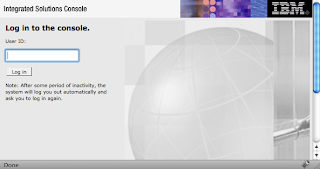


If you didn't set up security you will just be able to click the 'Login' button, if you did you will have to enter an ID and password.

You should now be in a position to experiment with the OSGi Alpha as described here

Finally...


This is all quite easy to work through but there are some additional things that it's helpful to know:

You will find the log files here:

WAS_HOME/profiles/AppSrv01/logs/server1

the one you are most likely to want if things don't go according to plan is SystemOut.log.

OSGi bundles are cached here:

WAS_HOME/profiles/AppSrv01/config/bundlecache

It can be useful to look and see what is in there.

The OSGi samples (and their source code) can all be found here:

WAS_HOME/feature_packs/aries/

** If you do use Ubuntu to run WebSphere you will need to make sure that /bin/sh is linked to /bin/bash, not /bin/dash.